您现在的位置是:网站首页> 编程资料编程资料
在Google Container Engine上申请创建Docker容器 _建站经验_网站运营_
 2023-04-13
1023人已围观
2023-04-13
1023人已围观
简介 在Google Container Engine上申请创建Docker容器 _建站经验_网站运营_
(1)要申请一个Google账户。
(2)激活Google账单,即绑定支付信用卡,为使用Google的服务买单。激活过程中为了验证信用卡是否可用,需要支付1美元的费用。
激活支付地址:https://console.developers.google.com/billing?_ga=1.62759852.1080048005.1441690490
支付激活后,可以看到能够使用的一些服务,同时看到可以免费使用60天。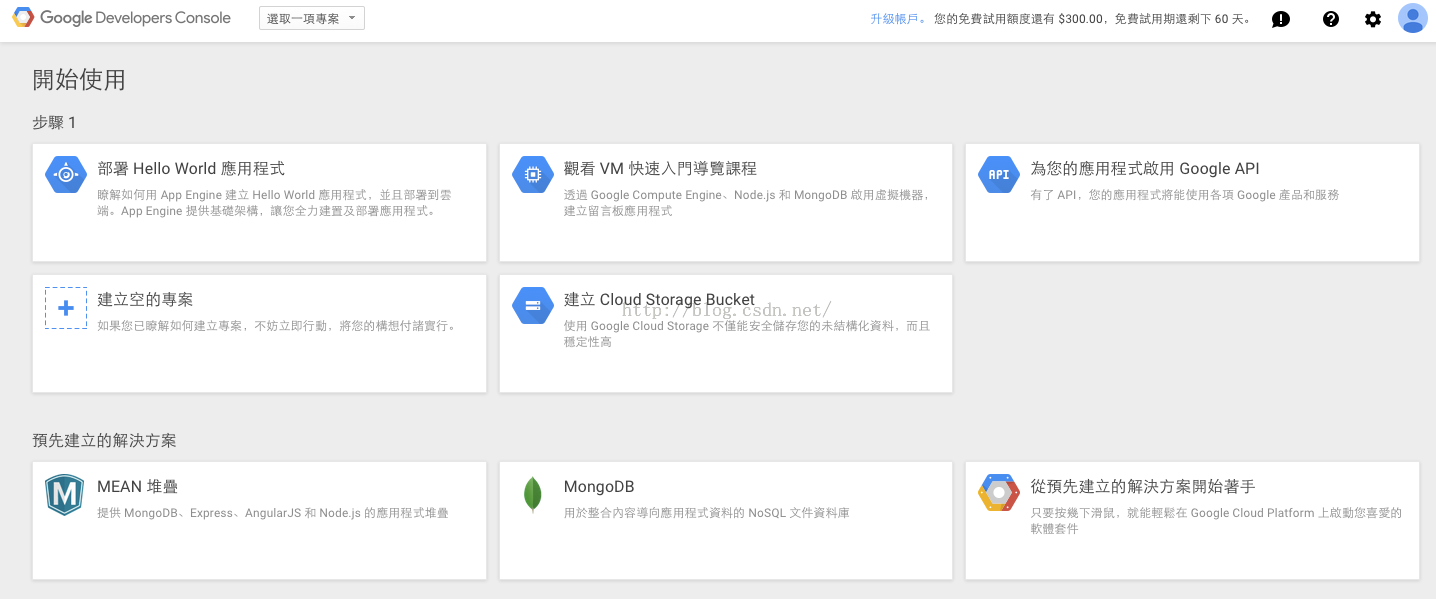
(3)激活Google API
激活后,可以使用如下两种服务:
Google Container Engine API
Google Compute Engine and associated APIs
创建一个gerry-test-proj工程:
然后点击建立,会自动跳转到当前创建好的工程中:
(4)安装gcloud
到Google Cloud SDK上可以下载到各个版本的客户端:https://cloud.google.com/sdk/#windows
安装方法也有说明。安装完成后,可以看下gcloud的使用方法:
root@gerryyang:~# gcloud -h
Usage: gcloud [optional flags]
group may be auth | components | compute | config | container |
deployment-manager | dns | sql | topic
command may be docker | feedback | help | info | init | version
The *gcloud* CLI manages authentication, local configuration, developer
workflow, and interactions with the Google Cloud Platform APIs.
optional flags:
--account ACCOUNT Google Cloud Platform user account to use for
invocation.
--format FORMAT Format for printed output.
--help Display detailed help.
--log-http LOG_HTTP Logs all HTTP server requests and responses to stderr.
(true/false)
--project PROJECT_ID Google Cloud Platform project ID to use for this
invocation.
--quiet, -q Disable all interactive prompts.
--trace-token TRACE_TOKEN
Token used to route traces of service requests for
investigation of issues.
--user-output-enabled USER_OUTPUT_ENABLED
Control whether user intended output is printed to the
console. (true/false)
--verbosity VERBOSITY Override the default verbosity for this command. This
must be a standard logging verbosity level: [debug,
info, warning, error, critical, none] (Default:
[warning]).
-h Print a summary help and exit.
-v, --version Print version information.
command groups:
auth Manage oauth2 credentials for the Google Cloud SDK.
components List, install, update, or remove Google Cloud SDK
components or packages.
compute Read and manipulate Google Compute Engine resources.
config View and edit Google Cloud SDK properties.
container Deploy and manage clusters of machines for running
containers.
deployment-manager Manage deployments of cloud resources.
dns Manage your Cloud DNS managed-zones and record-sets.
sql Manage Cloud SQL databases.
topic gcloud supplementary help.
commands:
docker Provides the docker CLI access to the Google Container
Registry.
feedback Provide feedback to the Google Cloud SDK team.
help Prints detailed help messages for the specified
commands.
info Display information about the current gcloud
environment.
init Create and initialize a gcloud workspace in the current
directory.
version Print version information for Cloud SDK components.
然后使用gcloud登陆GCP账户(即,完成认证):
后记
越来越多的公司开始使用容器来构建应用,它可以方便地实现扩展、复制以及升级。这个新服务提供了一种全新的途径来管理大量容器,免除了涉及到多容器业务流操作的大量底层工作。
Google于2014年11月首次对外发布了容器引擎,不过只是预览版本。随着这次商业性的发布,Google确保该服务已经具备好应对生产环境的各种条件,并承诺99.95%的正常运行时间。
另外,定价也已经确定。少于6个节点的用户可以免费使用,若需管理多于6个节点则需为每个集群支付$0.15/小时的费用。
Google自身早已使用容器来运行Internet服务,例如搜索和邮箱服务。
通过容器,公司可以让每个组件包含一部分应用,以模块化的方式构建它们的应用,这就是广为人知的微服务架构。当应用需要更新时,一个新的容器可以轻易地实现替换,以减小对操作的影响。
容器也为DevOps形式的软件开发创造了条件。这种情况下,开发者在开发应用时快速地迭代,通过在容器中打包,每个独立的组件都可以轻松地进行测试。
通过这个服务,用户在单次操作中,完成对多容器复杂应用的部署。GCE会记录操作日志,以确保每个容器的正确运行,它也提供一条简易的途径,通过增加额外的处理器或内存,来调整集群的大小。
相关内容
- INXY:运作全球26个国家和地区的 独立服务器、VPS、CDN业务,价格超便宜_建站经验_网站运营_
- 如何去建设一个符合网络推广的网站呢?_建站经验_网站运营_
- 营销型的企业网站如何定位?营销型的企业网站要具备哪些特点?_建站经验_网站运营_
- 如何建立一个自己的网站?不懂代码搭建自己网站详细教程_建站经验_网站运营_
- 无限制硬盘空间与流量的HostGator鳄鱼主机购买与认证教程_建站经验_网站运营_
- http和https的关系与优缺点等区别分析(附图解)_建站经验_网站运营_
- 网站改版如何降低百度惩罚及快速恢复排名的方法汇总介绍_建站经验_网站运营_
- 给大家推荐一个接码平台-飞讯验证码_建站经验_网站运营_
- 给大家推荐一个很方便的接码平台,一码验证码平台_建站经验_网站运营_
- HostUS主机购买及香港机房VPS国内使用评测_建站经验_网站运营_